|
|
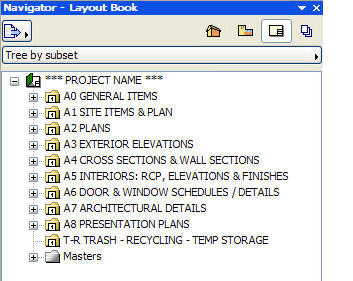
The Layout Book is where construction documents and presentations are prepared for output on paper or for electronic distribution. A well-defined and organized Layout Book helps to “get the drawings out” quickly and easily.The hierarchy of Layouts allows large conceptual divisions to be seen easily. Each of the folders below refers to a group of sheets, each with their own numbering system, easily customizable.
|
THE MASTERS
|
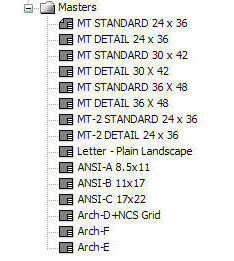
Master Layouts are where you place your title block and (where appropriate) a grid. In MasterTemplate, Autotext is used as much as possible to make it easy for the Layouts to reconfigure and stay current. It’s easy to bring in and integrate your old CAD title block, or you can simply add your company information into the standards.In the list of Master Layouts you’ll see variations for all common paper sizes (U.S. or Metric, depending on which version you choose), with sheets set up for gridded details as well as free-form placement of drawings. As with all things in MasterTemplate, sheet sizes can be easily modified to accommodate your preferred options.
|
|
 THE SHEETS ARE WAITING FOR YOUR DRAWINGS THE SHEETS ARE WAITING FOR YOUR DRAWINGS
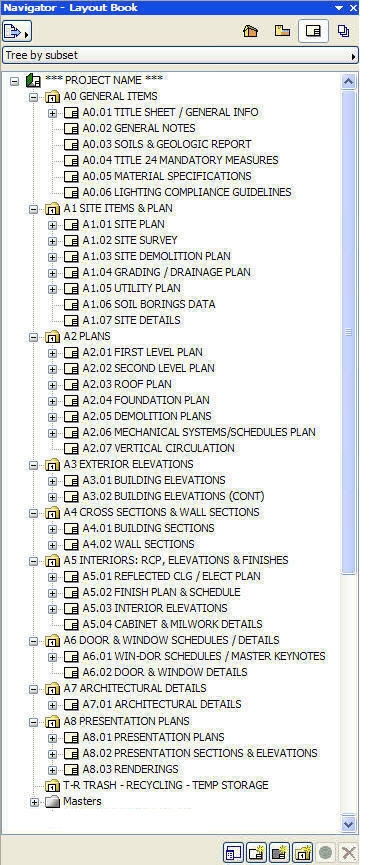
Here are the division folders opened up to show the standard sheet organization. Notice how the majority of the Layouts have a “plus” sign next to them – that means they already have one or more Drawings pre-placed. As soon as you build a model, appropriate Views will show up on the right sheets!
ArchiCAD is smart enough not to waste time updating the sheets continuously, and generates each Layout when you’re ready to check it or print it out. In fact, the Drawings are set for Manual Update so you will never have to wait to view a Layout sheet.
However, you can be sure that everything is consistent, because with a simple Update command, the program makes sure that all the views show the same version of the building data and all the call-outs are up to date!
The Layout Book is cleanly organized and well defined for all phases of project development. The hierarchy can be opened up selectively as needed. Sheets that aren’t needed (for example Details while you are doing Schematic Design) can be placed into the TEMP STORAGE folder and will not show up in the automatic Sheet Index.
THE BOTTOM LINE
All of this took a while for us to set up, but you won’t have to. It’s built into MasterTemplate!
|